Mantra L1 RD Service Recharge Online – Complete Guide
Purchase RD Service from Here
Mantra L1 RD Service Recharge is essential for users who use Mantra biometric devices for Aadhaar authentication, AEPS banking, eKYC verification, CSC services, and digital identity authentication. Without active RD Service, biometric devices may stop working properly and show authentication errors.
If your device shows:
- RD Service Expired
- Capture Failed
- Device Not Registered
- Authentication Failed
- Fingerprint Not Detected
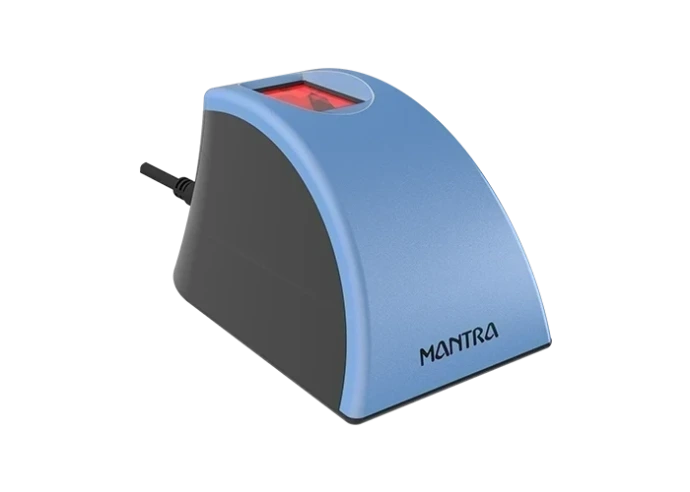
then your device requires Mantra L1 RD Service recharge or activation.
This blog explains everything about Mantra L1 Recharge, activation process, benefits, troubleshooting solutions, and why choosing a trusted recharge platform is important.
What is Mantra L1 RD Service?
Mantra L1 RD Service is a UIDAI-compliant biometric authentication service used for secure Aadhaar verification and encrypted fingerprint authentication.
L1 security improves:
- Device authentication security
- Aadhaar verification process
- Encrypted biometric communication
- Safe identity verification
Mantra L1 devices are widely used for:
- Aadhaar Authentication
- AEPS Banking
- eKYC Verification
- CSC Services
- Government Authentication
- Banking Transactions
Why Mantra L1 RD Service Recharge is Important
RD Service recharge keeps your biometric device active and secure.
Benefits of Mantra L1 Recharge
Secure Aadhaar Authentication
Provides encrypted biometric verification.
Fast Activation
Recharge process activates the device quickly.
Better Device Performance
Updated RD Service reduces errors and improves speed.
UIDAI Compliance
Keeps devices compatible with UIDAI standards.
Smooth AEPS Transactions
Continue banking and Aadhaar-enabled payment services without interruption.
Common Errors in Mantra L1 Device
Users may face errors when RD Service expires or drivers become outdated.
RD Service Expired Error
Solution:
Recharge RD Service online and restart the device.
Capture Failed Error
Solution:
- Clean scanner properly
- Update drivers
- Restart the system
Device Not Registered
Solution:
- Activate RD Service
- Reinstall drivers
- Restart device
Fingerprint Not Detected
Solution:
- Use proper finger placement
- Clean scanner glass
- Use another USB port if required
How to Recharge Mantra L1 RD Service Online
The recharge process is simple and secure.
Step 1: Check Device Serial Number
Locate the serial number printed on the backside of the device.
Step 2: Visit Recharge Website
🌐 Website: https://www.rdservice.online/mantra
Step 3: Enter Device Details
Fill:
- Device Serial Number
- Mobile Number
- Email Address
Step 4: Complete Online Payment
Payment methods:
- UPI
- Debit Card
- Credit Card
- Net Banking
Step 5: Activation Process
After successful payment:
- RD Service gets activated
- Device registration updates automatically
- Authentication services resume
Activation usually completes within 2 to 5 minutes.
Why Choose RD Service Online?
✅ Instant Activation
✅ Secure Payment Gateway
✅ Fast Technical Support
✅ Genuine RD Service Renewal
✅ Trusted Recharge Platform
✅ Easy Online Process
Applications of Mantra L1 Devices
Mantra L1 biometric devices are used for:
- Aadhaar Authentication
- AEPS Banking
- eKYC Verification
- Government Services
- Banking Verification
- Digital Identity Authentication
Tips for Better Device Performance
- Keep RD Service updated
- Use stable internet connection
- Restart device after activation
- Keep scanner clean
- Use original USB cable
Best SEO Keywords
- Mantra L1 RD Service Recharge
- Mantra RD Service Online
- Mantra L1 Recharge
- RD Service Activation
- Mantra Biometric Recharge
- Aadhaar Fingerprint Device
- Online RD Service Renewal
- Mantra Device Activation
- AEPS Biometric Device
- Fingerprint Scanner Recharge
Conclusion
Mantra L1 RD Service Recharge is necessary for uninterrupted biometric authentication, Aadhaar verification, and AEPS services. Regular recharge helps maintain device security, improve performance, and reduce authentication errors.
Recharge your Mantra L1 RD Service online today and continue secure biometric operations without interruption.
🌐 Website: https://www.rdservice.online/mantra
📞 Support: 8460048260